
AXS Tickets
AXS, LLCEntertainment
4.711.09K Reviews
- Version
- 6.30.3
- Installs
- 10.00M
- Age Rating
- Everyone
Screenshots
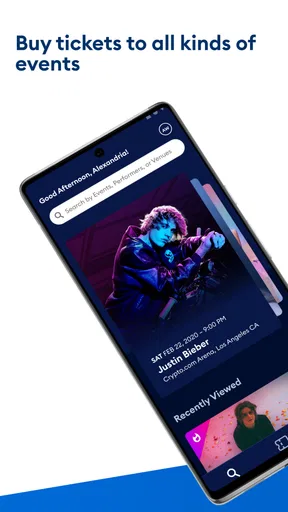
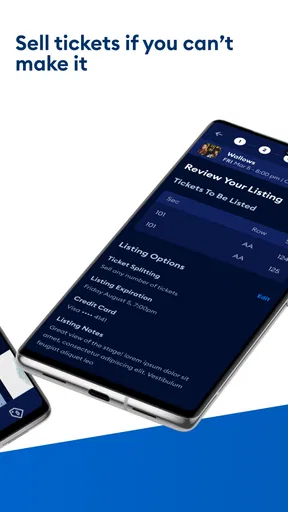
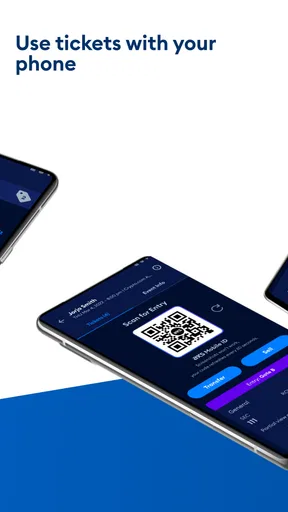
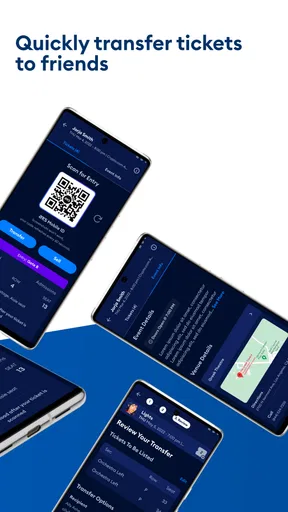
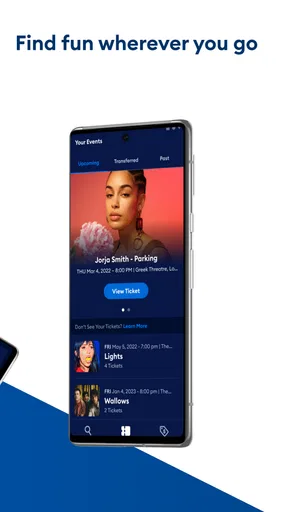
Our Review of AXS Tickets
 Analysis by Appyee
When I want to find tickets without opening a desktop browser, AXS Tickets is the app I would try first for events handled through AXS. It sits in the entertainment category, costs nothing to install, and is aimed at a very practical job: helping me discover an event and continue through the ticket-buying process from a phone. That sounds simple, but the value depends heavily on how quickly I can move from browsing to a useful event page, especially when interest is high.
My overall impression is that this is a focused ticketing tool rather than an all-purpose nightlife guide. It makes sense for someone who already knows the artist, venue, team, or event they are looking for, and it can also help when I am open to discovering something nearby. It is less compelling if I want one app to compare every ticket marketplace in one place. AXS, LLC has built a recognizable destination for its own ticket ecosystem, not a universal search engine for every possible seller.
How the app feels when speed matters
The first thing I notice with a ticket app is not visual polish; it is how much effort stands between opening it and understanding what is available. AXS Tickets benefits from having a clear purpose. I am not entering a social feed, configuring a complicated profile, or learning a specialized tool. I can approach it with a straightforward question: what event do I want, and can I get tickets?
That focused design can make ordinary browsing feel quicker than using a general web search. Instead of jumping between search results, venue pages, and unrelated resale listings, I can stay within the AXS environment while checking event information. The practical advantage is greatest when I have a specific destination in mind. Searching for a known performer or event is a more natural workflow here than casually browsing the entire entertainment market.
There is an important distinction between perceived speed and actual availability, though. A fast-loading event page does not guarantee that desirable seats will remain available, and a smooth app cannot remove the pressure of a popular on-sale. I would not judge the application solely by how quickly it opens during a calm afternoon. Ticketing performance is also shaped by demand, account steps, event rules, and the particular venue or organizer behind the listing.
For everyday discovery, I prefer to do the relaxed part early. I can look up an event, read the details, and understand the date and venue before I am ready to buy. That reduces frantic decision-making later. My useful tip is to treat the app as a planning tool first and a last-second rescue tool second. If I already know what I want, saving the event details mentally or noting the start time of the sale gives me a better chance of moving efficiently when I return.
What happens during busy ticket releases
The most demanding moment for any ticketing app is a popular release. This is where a simple browsing experience can turn into repeated loading, changing availability, or a purchase flow that requires patience. I would keep the app open only when I am ready to act, rather than beginning a high-demand search while distracted and then assuming the same options will still be there later.
A useful workflow is to decide my limits before selecting seats. I would set a total budget, choose whether I care more about location or price, and keep an acceptable alternative in mind. That is not a special feature of AXS Tickets, but it matters more in a ticketing app because hesitation can cost an option. When the available choices change quickly, knowing my priorities prevents me from refreshing aimlessly or restarting the search after every small change.
I also would not interpret a temporarily slow or incomplete result as proof that the app has failed. During a busy release, availability can change while I am looking at it. Repeating the same action too aggressively may make the experience feel more chaotic, not less. My preference is to pause briefly, confirm whether the page has updated, and then continue through the normal flow rather than tapping every control several times.
This is one of the app’s central trade-offs: a dedicated seller can provide a direct route to its own events, but that route is not the same as guaranteed access to the best seats. If the event is important, I would prepare my account and payment details before the sale begins, use a stable connection, and avoid switching between several devices unless there is a clear reason. Those habits reduce avoidable friction without pretending that demand can be solved by software.
Reliability after the excitement is over
Reliability in ticketing is broader than whether the application launches. I want the event information to remain understandable, the purchase process to give clear feedback, and my next step to be obvious after I finish. I also want confidence that I can return to the app later instead of relying on a single browser tab or an old search result.
AXS Tickets has the advantage of being maintained by AXS, LLC and of having a long presence in the mobile app space. It was released on August 27, 2013, and its current version is 6.30.3. Those details do not guarantee a perfect session, but they suggest this is an established product rather than a temporary companion app created for one event season.
The app’s audience size also gives me some context. It has a 4.7 average from around 134 thousand ratings, with roughly 11 thousand written reviews, and it has passed 10 million installs. I read those figures as evidence that many people find the app useful, not as a promise that every phone, venue, or transaction will behave identically. A strong average can coexist with frustrating experiences when tickets are scarce or when a particular event has unusual requirements.
For recovery, I would use a simple rule: if I have reached an important confirmation screen, I would avoid immediately repeating the purchase. First I would check the account area or any confirmation information visible in the app, then verify whether the order appears before trying again. This is especially important in ticketing because a delayed response can feel like a failed transaction even when the system is still processing it. The app can help organize the process, but careful user behavior remains part of reliable use.
Another practical habit is to keep the application updated when an important event is approaching. The current version is 6.30.3, and using the latest available release is sensible for compatibility and bug fixes. I would update well before the sale rather than minutes before it, because an unexpected restart or a newly changed interface is the last thing I want during a time-sensitive purchase.
Phone limits, operating system fit, and resource expectations
The minimum operating-system requirement is Android 8.0. That makes the app accessible to a broad range of Android phones, although compatibility alone does not tell me how comfortable it will feel on an older device. A phone that technically runs a modern ticketing app may still have slower storage, limited free space, or an aging connection. I would judge the experience by the whole device, not only by the operating-system number.
On a newer phone, I would expect ordinary browsing to be manageable because the app has a narrow purpose. I would still close unrelated downloads and background activity before a major ticket release. That is less about claiming that AXS Tickets is unusually demanding and more about removing distractions when timing matters. A phone struggling with several active apps can make any purchase flow feel unreliable.
Resource demands also include attention. Ticket apps can consume more mental energy than storage or battery because they ask me to compare event details, dates, seat choices, and final costs under pressure. I find the app most comfortable when I use it in short, deliberate sessions: discover an event, inspect the important information, make a decision, and leave. Keeping it open all day while repeatedly checking changing availability is a poor use of both battery and patience, regardless of the phone.
People using older Android hardware should also plan a fallback. If the app opens slowly or becomes awkward during a busy release, I would want access to the AXS web experience or another trusted device if one is available. That does not make the app unusable; it simply recognizes that the most important purchase should not depend on one aging handset. Users with very old software below Android 8.0 should look for a compatible alternative rather than assuming installation will work.
Where it fits better than general alternatives
Compared with a general web search, AXS Tickets gives me a more direct path when I already know the event belongs in the AXS ecosystem. I spend less time sorting through pages that may lead to unrelated sellers, outdated information, or broad entertainment listings. The app is also more convenient than relying on a desktop when I am away from home and want to check an event immediately.
Compared with broad ticket marketplaces, the limitation is just as clear: I should not expect a complete cross-platform comparison. If my main goal is to compare inventory, fees, or resale options across many providers, a marketplace with that specific scope may suit me better. AXS Tickets is the better choice when direct access to AXS events matters more than surveying the whole market.
Compared with venue-specific apps, AXS can be more useful when I follow events at different locations that use the same ticketing service. A venue app may still be preferable for local announcements, venue policies, maps, or information unrelated to buying a ticket. I would use each tool for its strongest job instead of expecting one application to replace every source of event information.
The app is also a reasonable fit for casual planners. A free entertainment app with an Everyone age rating is easy to recommend to adults arranging a concert night, families checking an event, or friends deciding what to do later in the month. However, the age rating does not mean every event itself is suitable for every person. I would still check the individual event details, especially when attending with children or when the venue has its own restrictions.
Who should use it and who should skip it
I would recommend AXS Tickets to someone who regularly attends concerts, sports, comedy, or other live entertainment offered through AXS. It is especially useful for a person who wants mobile access, prefers a direct seller, and values being able to search while traveling or making plans with friends. The app’s large install base and strong average rating make it an easy candidate to try when AXS is the relevant ticket source.
I would be more cautious recommending it to someone who wants to scan every available provider before deciding. That person may be better served by a comparison-oriented service, then use AXS only when it offers the event or inventory they actually want. I would also not make it my only plan for a highly important, high-demand event if my phone is old, my connection is unstable, or I have not prepared my account beforehand.
One realistic example is a Friday afternoon when a friend sends me an event suggestion while I am away from my computer. I can open the app, search for the event, check whether the date works, review the venue, and decide whether it fits our plan. If we are not ready to buy, I can leave the decision until we have agreed on a budget. If we are ready, I would complete the process without juggling several unrelated websites. That is the kind of small, everyday convenience the app delivers well.
A different example shows its limits. If my friends are comparing several sellers for the cheapest possible option, I would not rely on AXS Tickets alone. I would use it to inspect the official AXS listing, then make a broader comparison elsewhere. The app is strongest when the question is “Can I find and buy this AXS event?” rather than “Where on the entire internet is this ticket cheapest?”
My performance verdict
After looking at speed, busy-use behavior, recovery, and device constraints, I see AXS Tickets as a practical, established entertainment app with a clear boundary. It can make event discovery and ticket access more convenient, particularly when I already know what I am searching for. Its free price, Everyone rating, Android 8.0 minimum, and current 6.30.3 release make it approachable for many users, while its long history and substantial audience add confidence that it is not an abandoned tool.
The best performance tip is to prepare before demand peaks, not to depend on frantic refreshing once it does. I would update the app early, use a dependable connection, decide my budget in advance, and verify the result before repeating a purchase attempt. Those steps address the real friction points more effectively than simply expecting the app to be fast in every situation.
My final recommendation is positive, with a clear condition: install it when AXS is a ticket provider you actually use. I would not choose it as a universal replacement for every ticket marketplace, but I would keep it available for direct event discovery and mobile purchasing. For the right event and the right user, it removes unnecessary steps; for someone focused on cross-provider comparison, another service will be a better first stop.
Verdict
Strengths of AXS Tickets
- Mobile ticket access reduces the need to carry printed tickets.
- Event details, venue information, and entry times are easy to check.
- Tickets can be transferred to friends directly from the app.
- The interface is generally straightforward for browsing upcoming events.
- Official ticket storage can help reduce the risk of counterfeit tickets.
Limitations of AXS Tickets
- Some tickets may not appear until shortly before the event.
- Fees and service charges can make the final price higher than expected.
- Ticket transfers may depend on the event organizer’s restrictions.
- The app may require a stable connection when loading tickets at entry.
- Support response times can vary during busy sales or event periods.
Similar Picks in This Category
View All
Google Play Games
Google LLC3.9

Netflix
Netflix, Inc.4.8

YouTube Kids
Google LLC4.2

Disney+
Disney4.4

Prime Video
Amazon Mobile LLC4.7

Steam
Valve Corporation3.2
Frequently Asked Questions
What is AXS Tickets, and what can I use the app for?
AXS Tickets is a mobile ticketing app for discovering events and managing tickets for concerts, sports games, festivals, comedy shows, and other live entertainment. After signing in, you can search for participating events, purchase available tickets, view upcoming bookings, access mobile tickets, and sometimes transfer or sell eligible tickets directly through the app. Availability and features may vary by event, venue, and country.
Do I need an AXS account to buy or access tickets?
In most cases, you need an AXS account to purchase tickets and access mobile tickets after completing an order. The email address used during checkout is important because it is normally connected to your booking and ticket delivery. Before downloading the app, make sure you can access that email account and use a current phone number, since identity verification or sign-in confirmation may be required.
How do mobile tickets work at the venue?
AXS mobile tickets are generally displayed inside the app and may use a changing barcode or other security technology, meaning screenshots might not be accepted at the entrance. Open your ticket before arriving, sign in beforehand, and keep your phone charged. It is also sensible to use a reliable internet connection before reaching the venue, although some tickets may remain available offline once loaded.
Can I transfer, sell, or share tickets through AXS Tickets?
Some AXS tickets can be transferred to another person or listed for resale, but these options are not guaranteed for every event. The organizer, venue, ticket type, and local regulations determine whether transfer or resale is available. If the feature appears in your order, carefully enter the recipient’s details and review any deadlines, fees, restrictions, or delivery conditions before confirming the transaction.
What should I do if I cannot access my tickets or have a problem with an order?
If your tickets are missing, delayed, or inaccessible, first confirm that you are signed in with the same email address used for the purchase and check your order history. Updating the app, restarting your device, and checking your connection may resolve technical issues. If the problem continues, use the official AXS help or customer-support channels and keep your order number, event details, and purchase email available.
